
Hubble Connected for Motorola
Hubble ConnectedParenting
3.75.15K Reviews
- Version
- 6.5.70
- Installs
- 1.00M
- Age Rating
- Everyone
Screenshots
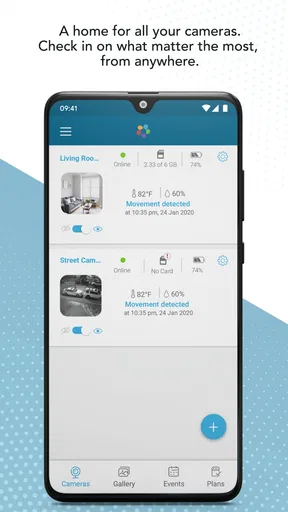
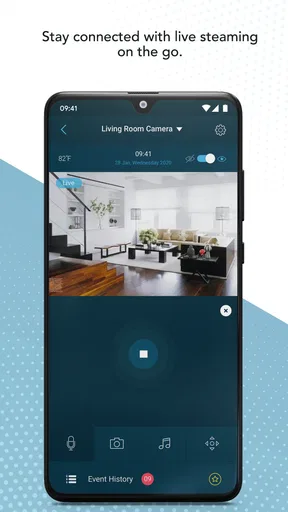
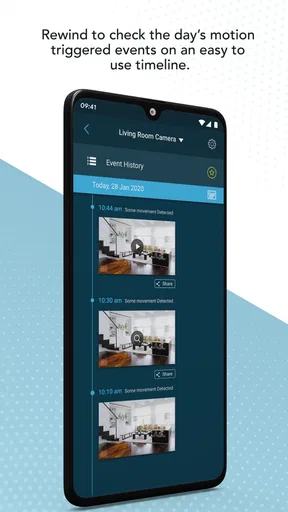
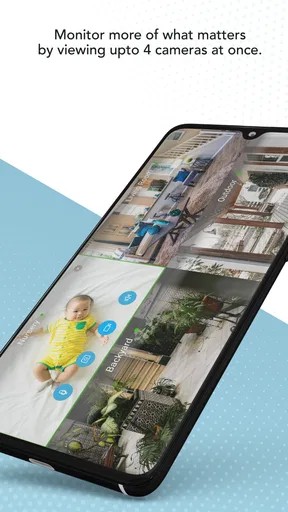
Our Review of Hubble Connected for Motorola
 Analysis by Appyee
If you're a parent like me, always on the lookout for ways to keep an eye on your little one while juggling a million other things, then Hubble Connected for Motorola might just be your new best friend. Let me take you through my experience with this app and why it could be a game-changer for your parenting toolkit.
Readable at a glance, with a monitor at the center
For a baby-monitoring app, the important question is not whether every screen looks clever; it is whether I can get to the useful view when I am tired or distracted. The main appeal here is the direct relationship between the app and a compatible Motorola monitor. Rather than being a general parenting hub that asks me to sort through unrelated tools, it is built around checking the camera and its monitoring functions. That focus can make the basic job feel more manageable.
Hubble Connected is a free parenting app from Hubble Connected, and its current version is 6.5.68. It has an average rating of 3.8 from around 26,000 ratings, with over a million installs. Those figures suggest that plenty of families have tried it, but they do not tell me whether it will suit a particular household. The real deciding factor is whether you already have, or plan to use, a compatible Motorola baby monitor.
A useful way to make the app easier to use is to decide in advance what you actually need to check. If you mainly want a quick video glance, keep that as your first action instead of treating every alert as a reason to open every available control. When sharing care with another adult, agree on who is responding to notifications and who is just checking in. That simple routine can prevent two people from reacting to the same sound while a more important task is left unattended.
Getting Started with Hubble Connected
First things first, setting up Hubble Connected for Motorola is a breeze. You just download the app, create an account, and pair it with your compatible Motorola baby monitor. In no time, you're all set to start monitoring your little one's every move from your smartphone.
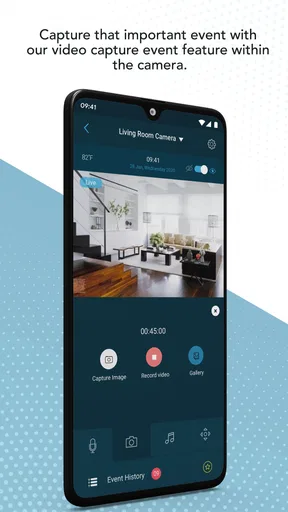
The app interface is intuitive and user-friendly, which is a blessing if you're like me and not exactly a tech wizard. With just a few taps, you can access live video feeds, adjust camera angles, and even talk to your baby through the two-way communication feature. It's like having your very own baby surveillance system right in your pocket!
The key caveat is that the app is not a standalone camera or a replacement for a monitor: its usefulness depends on pairing it with compatible hardware. Before choosing it, I would check that the Motorola monitor I intend to use works with the app and that the camera can cover the place where the baby sleeps. If you do not own compatible equipment and want a low-cost app-only solution, this is probably the wrong starting point; a simple audio monitor or another setup you already own may be a better fit.
Features That Stand Out
Now, about those features. What's cool about Hubble Connected is the array of functionalities it offers. The real-time video streaming lets you keep a watchful eye on your baby from anywhere, whether you're in the next room or out for a quick errand.
Moreover, the app comes with a selection of soothing lullabies and audiobooks. And let me tell you, those lullabies can work wonders when your little one is feeling restless. It's like having a virtual nanny singing your baby to sleep.
One feature that really impressed me is the temperature and humidity monitoring. You can keep track of the room conditions and make adjustments as needed to ensure your baby is comfortable at all times. It's like having an extra set of eyes keeping tabs on everything you might overlook.
These tools are most helpful when they fit into a predictable bedtime routine rather than becoming another source of stimulation. I would choose a lullaby before settling the baby, then leave the phone aside unless I need to check the camera or room readings. Temperature and humidity information can prompt me to look at the room, but I would treat it as context—not a substitute for checking the baby directly or following safe-sleep guidance.
Staying Connected, Anywhere, Anytime
The app's connectivity is pretty solid. Whether I'm connected to Wi-Fi or using mobile data, the video feed remains clear and uninterrupted. This reliability is crucial, especially during those late-night check-ins when peace of mind is all you need.
Another handy aspect is the ability to receive instant alerts. If any movement or sound is detected, you get a notification right on your phone. It's like having your very own mini security system specifically tailored for your baby.
For an everyday example, imagine making dinner while the baby naps in another room. A sound alert can tell you when to take a look, while live video gives you a way to check without immediately walking away from the stove. If the baby is simply stirring, you may not need to interrupt the nap; if you need to respond, the two-way talk can help you speak from where you are. I would still keep the phone within reach and avoid relying on a notification as the only way to know that something needs attention.
Remote viewing is also a different proposition depending on where you are. At home, a stable connection may make a quick glance straightforward. Away from home, I would first make sure the phone has a dependable connection and remember that video uses data. If a live feed pauses or an alert arrives late, the app cannot make a weak connection behave like a local monitor. For families who need monitoring to work even when the internet is unavailable, a dedicated monitor with a dependable local parent unit is the more sensible primary choice.
Different abilities and situations
For someone who finds small controls or busy screens tiring, the practical test is how easily they can reach the one or two actions they use most. I would keep the phone’s text and display settings comfortable, avoid adding unnecessary steps to bedtime, and try the controls in daylight before depending on them during a night check. The app’s purpose is clear, but the experience still takes place on a phone, so the size of the screen and the user’s comfort with touch controls matter.
Two-way communication can be useful for a caregiver who cannot immediately enter the room, but it is not equally helpful in every situation. A person with limited speech may prefer relying on video and alerts, while someone who has difficulty hearing may need to pay particular attention to how notifications appear on their device. I would test the alert behavior with the phone in the places where it will actually be used, rather than assuming a sound will always be noticed. The app can support a monitoring routine, but it should not be treated as an accessibility aid or as a guarantee that every caregiver will perceive every alert.
There is also a trade-off in sharing responsibility. A phone-based monitor is convenient when the person caring for the baby already has their phone nearby, but it can be awkward if that phone is being used for a call, left charging in another room, or handed to someone unfamiliar with the controls. Before another caregiver takes over, I would show them how to open the live view, where the camera controls are, and what an alert means. A dedicated monitor can be easier for a household that wants a separate device whose only job is monitoring.
What Could Be Improved?
Of course, no app is perfect, and while Hubble Connected for Motorola offers a lot, there are a few areas where it could improve. Sometimes, the app can be a bit slow to open, which can be a tad frustrating when you're in a hurry to check on your baby.
Additionally, while the app is generally stable, there were a couple of instances where it unexpectedly crashed. Although this didn't happen often, it's something to be aware of. A quick restart fixed the issue, but it’s certainly something I hope gets addressed in future updates.
That delay matters more when I am depending on the phone for a quick check than when I am casually reviewing a camera. I would not make the app the household’s only way to monitor a baby if the family needs instant access at all times. Keeping a familiar fallback routine—such as checking in directly when the app is slow—helps avoid treating a blank or delayed screen as reassurance. It is also worth checking the phone before bedtime, so a low battery or a device being occupied does not become an unexpected obstacle.
Families should also think about the cost beyond downloading the app. It is free to install, but it includes in-app purchases ranging from about six dollars to around $149 per item. That does not mean every family will need to buy anything; it does mean I would look carefully at what is included for the specific monitor and decide whether any optional extras solve a real need before paying. For a household that only wants basic checks, paying for add-ons without a clear purpose may not improve the day-to-day experience.
Compared with a basic audio monitor, this setup can offer a visual check and phone-based controls, but it also relies on a smartphone and compatible camera. Compared with a general-purpose home camera, its parenting focus and baby-oriented tools may be more relevant, while a general camera may suit someone who wants to monitor several kinds of spaces rather than a nursery. Neither alternative is automatically better: the right choice depends on whether video, remote access, and the Motorola monitor connection are genuinely useful to you.
Who it suits—and when I would choose something else
I can see this being a good match for parents who already use a compatible Motorola monitor, want to check the nursery from a phone, and appreciate having video, alerts, room readings, and soothing audio in the same place. It can also suit caregivers who move between rooms or occasionally need to check in while away, provided their connection and phone are reliable. Its Everyone age rating is consistent with a family utility, though the main user is naturally the adult responsible for monitoring.
I would hesitate if I wanted a monitor that works independently of a phone, if mobile data is limited, or if alerts on a small screen are difficult for me to notice. I would also compare alternatives if my priority were a simple audio-only setup, a device with a separate parent unit, or a camera system not tied to Motorola hardware. The app is not a universal answer to baby monitoring; it is most compelling when its companion monitor and phone-based approach already match the way a household cares for its child.
Final Thoughts
Overall, Hubble Connected for Motorola is a powerful ally for any parent. The convenience of having a reliable baby monitoring system right on your smartphone can't be overstated. It's packed with useful features that genuinely make parenting just a bit easier.
So, if you're in the market for a smart and reliable way to keep tabs on your little one, I'd definitely recommend giving this app a shot. It's like having an extra set of eyes and ears, giving you the peace of mind you deserve as you navigate the wonderful chaos of parenting.
Ready to try it out? You can download it from your preferred app store and start experiencing the comfort and security that comes with being connected to your baby, no matter where you are.
My recommendation is conditional rather than universal: I would try it when I already had compatible Motorola hardware and wanted the convenience of phone access, but I would keep a backup plan for moments when the app is slow or the connection is unreliable. The free download lowers the barrier to trying it, while the optional purchases make it sensible to decide what you need before spending more. If the controls feel comfortable and the alerts fit your routine, it can be a useful part of caregiving; if you need a dedicated, phone-independent monitor, I would choose that instead.
Verdict
Strengths of Hubble Connected for Motorola
- User-friendly interface for easy navigation.
- High-quality video streaming with minimal lag.
- Seamless connectivity with Motorola devices.
- Comprehensive parental control features.
- Customizable alerts for motion and sound.
Limitations of Hubble Connected for Motorola
- Limited features in free version.
- Occasional connectivity issues reported.
- High battery consumption on continuous use.
- Subscription required for premium features.
- Inconsistent customer support response times.
Other Releases by Hubble Connected
View All
Motorola by Hubble Connected
Parenting3.7

HubbleClub By Hubble Connected
Parenting3.9
Similar Picks in This Category
View All
Family Space
Motorola Mobility LLC.3.9

شرطة الأطفال - مكالمة وهمية
Oub Apps4.1

Findmykids: Parental Control
LETEM LTD4.6

Pregnancy + | Tracker App
Philips Electronics UK Limited4.8

Policía de niños - para padres
Kids police4.7

Pregnancy App
Amila4.9
Frequently Asked Questions
What is Hubble Connected for Motorola and what does it do?
Hubble Connected for Motorola is an app designed to enhance your Motorola smart devices experience. It allows users to monitor their home with ease, providing live video streaming, motion detection alerts, and two-way audio communication. It’s particularly useful for those using Motorola baby monitors or home surveillance cameras.
Is Hubble Connected for Motorola compatible with all devices?
The app is primarily designed for Motorola-branded smart home devices, such as baby monitors and security cameras. While it may work with some non-Motorola devices, it's highly recommended to check compatibility with your specific device model on the app’s website or app store description to ensure full functionality.
How user-friendly is the Hubble Connected app interface?
Hubble Connected is designed with user-friendliness in mind. The interface is intuitive, allowing easy navigation through features such as live streaming, notification settings, and video playback. Users can quickly set up devices and customize alerts, making it accessible even for those with minimal technical expertise.
Are there any subscription fees for using Hubble Connected?
While Hubble Connected offers basic functionality for free, there are premium features available through subscription plans. These plans may include extended video storage, advanced notifications, and enhanced customer support. Users should review these options in the app to decide if the additional features justify the cost.
What security measures does Hubble Connected offer to protect user data?
Hubble Connected prioritizes user security by employing encryption protocols to protect data transmissions. It also requires account authentication to access video feeds and personal information. Users are encouraged to regularly update their app and devices to maintain security and to use strong, unique passwords for their accounts.
